Author Archive

Creating stylish business logo with techie background

Creating stylish business logo with techie background

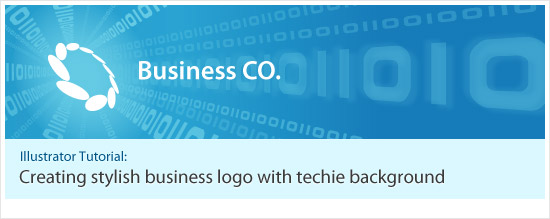
Today we are going to learn how to create a stylish business logo with techie background in Adobe Illustrator. This tutorial was actually a request by a reader early this month, but so sorry that it take so long until now I only manage to write this tutorial and post it up.

As mentioned earlier, the final outcome of this tutorial which shown above, was done by Adobe Illustrator, thanks to its powerful tools and filters. Well to do this tutorial, you need at least CS version or above, and have basic knowledge with it too. I will separate this tutorial into two part: First part is the creation of the logo while the second part is the background.

Part 1: Stylish Business Logo

Step 1: Well from the sample picture I had from the reader, the logo was created by a series of oval shapes that formed into a circle. So by using Ellipse Tool, create an oval shape, then rotate it about 20 degrees. Apply any color as you like but in this tutorial, I use #5BC1E5.

Step 2: Then we need to create some guidelines for the oval to travel in circle precisely. First, we create a circle and one vertical line and one horizontal line. Select three of them, open up Align Palette and hit Horizontal Align Center and Vertical Align Center. This step is to find out the center rotate point for the oval shape.

Step 3: To make things easier, please enable Smart Guides (Ctrl+U). Then, we place the blue oval shape on top of the circle, with the center point of oval touching the crossing point of the circle guide and vertical line.

Tip: You can use outline view (Ctrl+Y) and zoom in further for more precise result
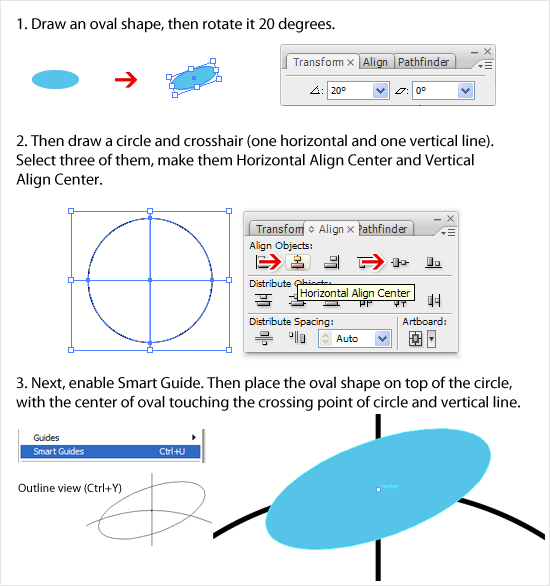
Step 1, 2, 3

Step 4: Now we will duplicate and rotate the oval to form the business logo. First, select the blue oval and then select Rotate Tool at the Toolbar. With the help from Smart Guides and guidelines created just now, move your mouse to locate the center point of the guidelines, shown in picture below.

Step 5: As soon you found the center point, press Alt while hitting left mouse button. The rotate point of the blue oval shape has just set by you. A Rotate window should pop up. According to the sample picture, the logo consists of 10 ovals, so we need to rotate 9 times with angle 36 degrees. So in the Angle field, enter 36 and select Copy. A new oval is duplicated. Then duplicate the process again by hitting Ctrl+D 8 times. You should have the similar final result as picture below.
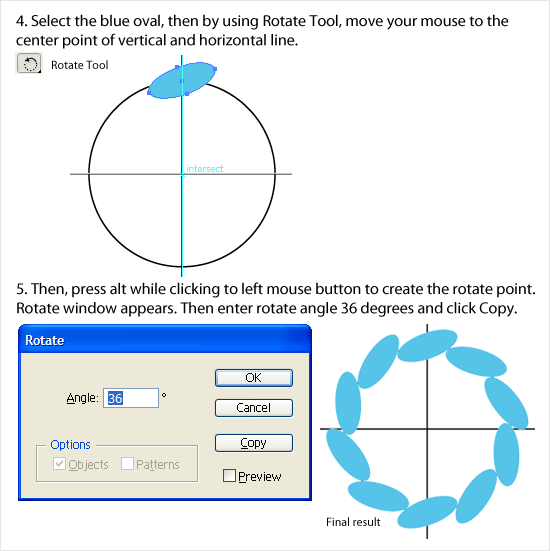
Step 4, 5

Step 6: Now we need to 3D rotate it. Remove the guidelines and select all and group the ovals, then open up the 3D Rotate Tool. Enter the numbers like picture below and click ok.

Step 7: Once satisfy with the 3D rotation, expand it (Object > Expand Appearance). Because the current logo is all stick together, so we have to divide them by using Pathfinder’s Divide Tool. After Divide, delete the unwanted shapes that does not belongs to the logo.

Step 8: Now we will make the final tweaking to the logo: to make them slightly smaller so that to have a little more gap between them. To achieve this, we use Offset Path (Object > Path > Offset Path). Enter Offset number -0.5px and hit OK. A new smaller ovals are created now.
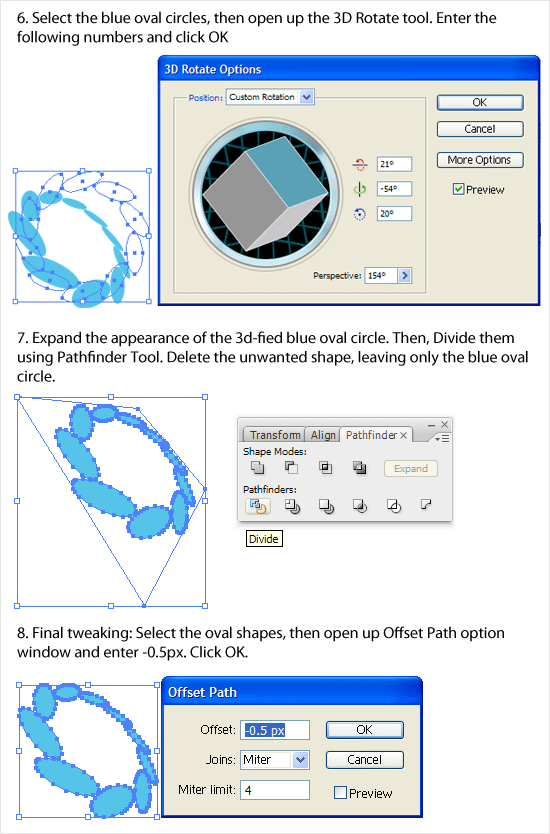
Step 6, 7, 8

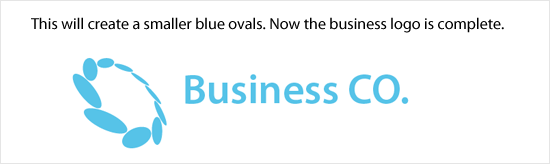
Logo Finished: Now the stylish business logo has finally created! Well you can accompany it with modern style Sans Serif fonts as logo type. In here, I use Myriad Pro.
Logo Finished

Part 2: Techie Background

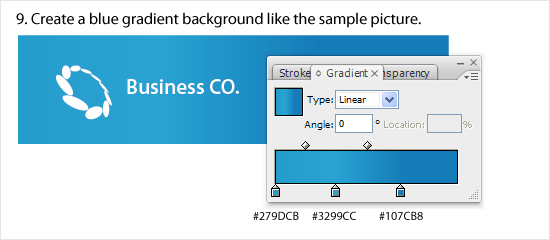
Step 9: Now it’s time to create the techie background. Create a rectangular shape behind the business logo which I colored it to white now with gradient color shown in picture below.
Step 9

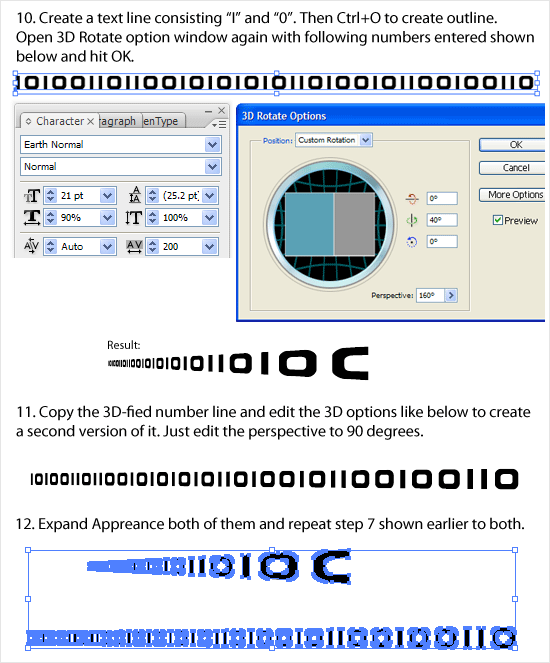
Step 10: We need to create a text line consists of character “I” and “0”. I found a font that looks sinilar to the sample picture which called Earth. By using this font, type out the text line, don’t type it too short. Once done, create Outline (Ctrl+O) the text and launch 3D Rotate Options again, and entering the values like picture shown below.

Step 11: Duplicate the 3D-fied number line and edit the 3D options to create a second version of it. All the values remain unchanged, but change the Perspective value from 160 to 90.

Step 12: Expand Appearance both of them and repeat Step 7 to both.
Step 10, 11, 12

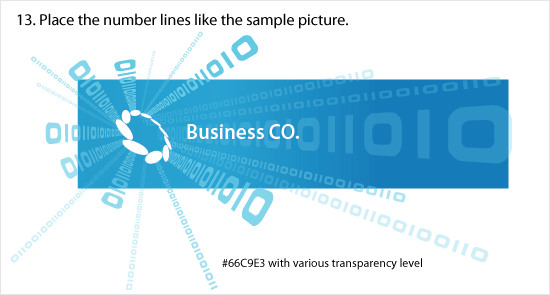
Step 13: Like the sample picture, we place the number lines, giving an illusion of the numbers are coming out from the logo. Color the lines #66c9E3 with verious transparency level, around 30% to 70%. Basically just not too strong until distract the logo.
Step 13

Step 14 & 15: Now we need to create a glow behind the logo. To do this, first create an oval shape, then Feather it with Racius of 25px. Click ok once done. You can adjust the size of the oval to make it a bigger glow. Make sure it fully glows over the logo.
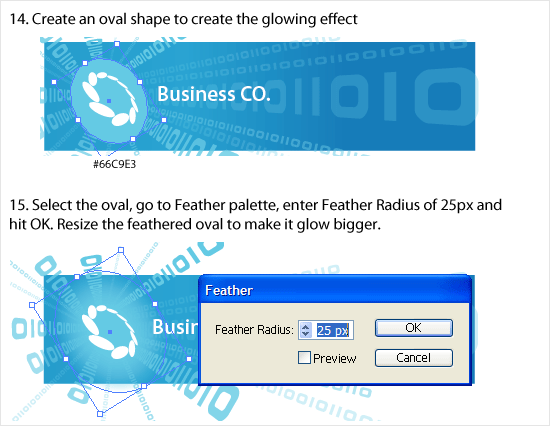
Step 14, 15

Step 16: We are getting close to final! Well, now by refering to the sample pic, there is one line that is slightly blurred. To do this, we duplicate the number line twice and place one on top and one at bottom of the original like picture below.

Step 17: Once done, apply Gaussian Blur (Effect > Blur > Gaussian Blur) to both of them, with value of 5.0. Click OK to finish.
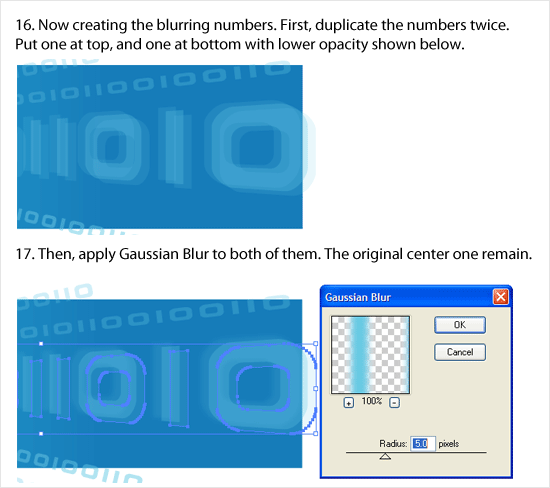
Step 16, 17

Final step: Finally, mask all the numbers and glow that exceeding the background rectangular. And now the tutorial has finally comes to the end! Let’s compare the Stylish Business Logo with Techie Background that created just now with the sample picture. Although it does not look close to it but hey, at least we knew how they done it! Basically this is it, hope you enjoy this lengthy tutorial! 😀
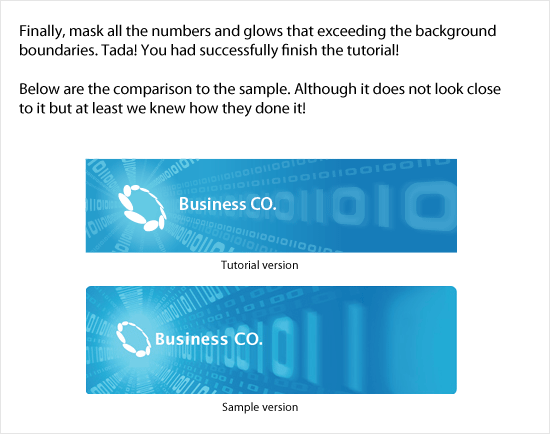
Final result

I’m officially a N.E.E.T

I'm a NEET!

Yesterday it was supposedly a normal day: waking up in the morning, having breakfast and going to work. Then in office, everyone gathers around the meeting room as there is important message to inform. And the message is due to unavoidable circumstances, company had no choice but close down. It was so shock and sudden that everyone, including me couldn’t response about it. Yes, now I’m one jobless dude.

As someone might not knowing, NEET means “Not in employment, education, or training”. Actually until now I still can’t believe that this happens to me. It’s a very sad because I really enjoying working in JGG with friendly colleagues. Now everyone has to find new path to continue the life. I have to accept this reality too, and with the time I’m having right now, it’s a great opportunity to think of what to do next. Yes, I’m now available for hire and I shall set up my portfolio page as soon as possible.

Despite the down moment, one thing that still able to continue cheering me up is this blog, my blog. It’s really good to have a personal blog! 😀


Resources: collar shirt vector template

Resources: collar shirt vector template

This is a free vector template for collar shirts. Well there are plenty of free templates for t-shirts available for download but I see less for collar or polo shirts, so I create one out and release it for download. Because it’s a vector file, you need to have vector software to use it for example Adobe Illustrator etc. Just grab the download link below, unzip it and start using it right away!


Download collar shirt vector EPS template (208kb zipped)

Unit PNG Fix is the best IE6 png hack out there

Unit PNG Fix is the best IE6 png hack out there

As web designers knew that Internet Explorer 6 does not support transparent PNG image files. It is really driving me crazy because recently I designed a site that requires heavy usage of transparent PNG images in background attributes. I had tried numerous png hacks available out there and they just couldn’t fully solve the problem. But finally I found the best solution – Unit PNG Fix.

Unit PNG Fix is lightweight and the response are quick. Basically, this fix able to find the PNG images and trick IE6 to display the transparencies. Big thanks to the team because I really want the web design to look as close to other modern browsers like Firefox, Safari etc in IE6, as it is still has a lot of users using it. Well, I really hope that they can switch to a better browser thou.

IE Death March

A little off topic, but still related to IE 6. Many designers hate IE 6, not only it does not support PNG transparency mentioned above, it is also not a web standard browser and it’s OLD. Many campaign springs out notably Save The Developers to encourage people to use a more modern browser. Well now there is IE Death March, to hope that people to drop the support for IE 6 by March 2009.

I think it’s a good move. I really hope that this web world is a happy world without IE 6.

These aren’t flash: 5+ sites powered by Ajax/Javascript

These aren't flash: 5 sites powered by Ajax/Javascript

Before Javascript, websites are pretty much static where the whole page refreshes and go to another page. If you want to have some little animations and the information loads within the same page, you will need flash to do. But now with Ajax and powerful Javascript framework like Jquery, Mootools, Script.aculo.us and more, websites can become “flash-like”.

From simple button rollover animation to complex like sliding tab content, Javascript can perform what Flash can do. With Javascript, the visitors interaction with the website become more friendly and interesting, and sometimes will giving “wow” effect too. Recently I spotted a few websites that powered by Javascript and looks really awesome. HTML websites now are no longer static.

Sebcreation

Sebcreation

ARSO // graffiti and design portfolio

ARSO

tap tap tap

tap tap tap

Kobe

Kobe

hören-sehen-schmecken: Startseite

hoeren-sehen

XiMnet

XiMnet Malaysia

October 2008 desktop wallpaper

October 2008 desktop wallpaper

It’s been a messy last month and yesterday I browsed through my documents, and I totally forgot that actually I made a wallpaper design and actually wanted to submit to Smashing Magazine October wallpaper. Well I missed it and this is my late post for October 2008 wallpaper!

As usual, my wallpaper design is dark based with simple graphic. It features a clock that formed the number “10” which indicates October, with the October dates on the right side. The color is monochrome and basically the design was done in Photoshop. Below are the wallpaper resolutions for your desktop. It’s a bit late to post this as October has come but I hope you like it!

Widescreen resolution

Normal, LCD & notebook resolution

Your web design to CSS/XHTML by Markup Service

Markup Service

There are dozens of sites on the web that offer PSD to HTML slicing services, and it becomes very frustrating to find the right one that will suit you 100%. Designers don’t like to code, but a professional XHTML / CSS is essential for each website. That is why it is sometimes very important to have a reliable coding service you can turn to.

The service that impressed me the most is PSD to HTML by Markup Service. They are professional, fast and secure. They have a personal approach to each client and they are open 24/7.

Markup Service

Delivery time

Markup Service converts PSD to HTML in 8 hours (per first page) and it takes them 3-6 hours to slice each inner page. This is one of the fastest services on the web, and what it more important, that they don’t have a fixed schedule. You can send them the design any time, any day and receive the XHTML / CSS in 8 hours. I don’t think anyone could go faster than that.

Skills

The code you receive after they convert your PSD to XHTML / CSS will be:

  • W3C Valid and compliant
  • Cross browser compatible (IE 6/7, FF 2/3, Opera 9+, Safari 2/3, Google Chrome)
  • SEO Semantic
  • Pixel precise
  • Optimized for load speed
  • Logically structured
  • Easy to update
  • Self explanatory in terms of class names

Order form

The Order Page of Markup Service is very user friendly and easy to work with. What I really like is the variety of options and packages they offer.

Markup Service

There are three packages – Standard, Professional and Deluxe and the following list of additional options to choose from: flexible width layouts, header/footer stretch, dynamic drop down menus, implementation of rollovers, sIFR implementation and implementation of SSI templates.

You can also choose from two CMS: WordPress or Joomla in case you need more than plain XHTML/CSS.

Prices

The price is based on the number of pages, the package and the additional options you choose. It is automatically calculated on the Order Page. The prices start at $139.

Markup Service offers a 50% discount for inner pages, and an additional 10% discount for bulk orders.

Policies

Markup Service has a very strong NDA policy, so you can be sure that if you outsorce your coding work, it will not appear anywhere on their site, and will not be shared with anyone. They also have a Money Back guarantee so you know that your money is secure with their company.

Examples and Testimonials

You can see some very warm feedbacks about Markup Service on their Testimonials page. Also, there are some examples to look at.

Note: This is a sponsored post.

Seen at KL: Hari Raya graffiti

Seen at KL: Hari Raya graffiti

Well it’s a bit late but here I wish “Selamat Hari Raya Aidilfitri” to all the Muslims, and wish you have a great celebration out there. Today is public holiday and I will have plenty of time to rest. Picture above is actually a street mural that I spotted last week, just outside the Pasar Seni LRT station. I think it’s really a nice masterpiece, so I took the picture and post it up here.

The graffiti is pretty long, and I have to take a total of 3 shots and connect them in Photoshop. Below is the smaller version of the graffiti, and you may click on the picture to view the bigger version. Sorry the picture is a little chopped off at both side.

Hari Raya graffiti full view small

I believe this was done by a group of creative artists that bombed their art at the Kuala Lumpur streets, I had to say that your arts are wonderful, and with all the colorful works, the KL looks more interesting!

“A Comic Book Christmas” Greeting Card Design Contest

Hello everyone, is design contest time. Folks over Foldees.com held a Christmas themed comic style greeting card design contest and stand a chance to win up to $2500 worth of cash and prizes! The cards, they can look like comic book covers, be designed as a comic strip, or even just depicting any sorta comic book artwork – be it anime, American, classic… anything goes! And this competition is open to all creative people from all over the world!

You can go to this contest page to find out the prizes, official contest rules as well as download the template AI file. For the sample designs of the card, you can refer to the Foldees blog to get a better picture. Creativity for card design is limitless, just that the output must be in pure flat colour vector art with no rasterization, filters, shadows or transparencies.

I think this is a great competition, and I will send my entry too. So what are you waiting for, just start design your card and send it in here before 20 October 2008! 😀

About Foldees

Started in 2008, Foldees was created to showcase the coolest greeting cards in the world. Where do these cards come from? You!

We believe that the coolest greeting cards in the world won’t come from a horde of creative directors in a fluorescent lit cubicle farm, but from the homes and cafes of the world, sorta like this guy….

We believe that everyone has at least one good idea or two, and that the office is just about the worst place to gestate those ideas (unless you’re doing it on the sly while your boss is out).

We believe that good creativity should be encouraged, and that’s why we pay our due credit, and royalties to the designers at each and every opportunity.

We believe that nothing says you care about someone like a greeting card that’s relevant to that someone, and that’s why we’ve created a site where people just like you are creating cards of all sorts, all over the world.

23 cool illustration style J-pop CD cover art

23 cool illustration J-pop cover art

Today we are going to appreciate the beauty of illustration style Japanese music CD cover art. CD cover art is something unique, some covers are designed to reflect the music styles and atmosphere, and some are to portray the personality of the music artists or groups. Many of them are using illustration instead of using their own appearance to design the CD covers, and it does giving an artistic sense of the artist itself. This also shows that art and music are inseparable!

Various illustration style can be apply to the cover design, for example some using clean vector style, and some are using hand drawing to illustrate the cover. Plus, it does not restricted only Japanese Pop music, many other music genres also using illustration style especially rock/alternative music. Well I don’t want to touch much on anime related soundtracks, because most of them are illustrated! Ok, below are the 23 covers selected by me.

高須光聖 松本人志 - 放送室

ロリコンの地位向上 - Land of the Phantasm

Sotte-Bosse- Namida no Koe

Rainbook - Sora no hana

YMCK - Family-Genesis

vistlip - Sara

TWIGY - BABY'S CHOICE

the telephones - JAPAN

Tatsuo Sunaga - World Standard.o7

Special Thanks - SEVEN COLORS

SCANDAL - YAH! YAH YAH! HELLO SCANDAL

relaxingroove - Sunset Lovers

myonmyon - 蓬莱姫譚

Murasama (ムラマサ☆) - WORLD

MORNING GLORY - I'm Still Green

Kigurumi (キグルミ) - Kigurumi's Children Songs

JUJU - My Life

dorlis - swingin' singin' playin'

De De Mouse - sunset girls

CHERRYBLOSSOM - GO!

Aqua Timez - Niji

Abe Fuyumi - One Night Trip EP

Chi - Chi's Sweet Home

Well this is it. I hope you like some of those cover designs. To check out the larger versions of the cover, I created a Flickr sets to store all these nice covers above and will upload more J-pop nice illustration style CD covers in the future.

Credits: Amazon JP, j-pop.cn