Author Archive

Creating Omspace 3D cylinder graphic in Illustrator

Creating Omspace 3D cylinder graphic in Illustrator

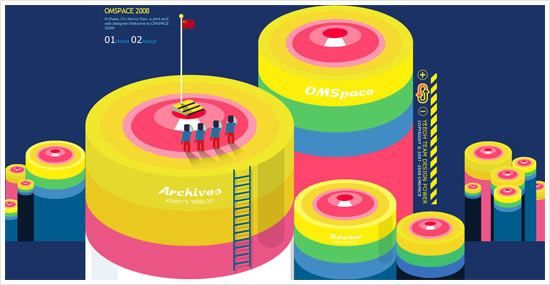
When entering Omspace, a weblog of Kenny Ren, immediately I was attracted by the huge and interesting 3D graphic header. Then, I wonder how to create the 3D Cylinder looking graphic in Illustrator. Well, actually it’s quite simple to achieve and I have plenty of fun too in the process.

To do this tutorial, Adobe Illustrator CS or above is a must, because we need to use the 3D function and if I’m not mistaken only Illustrator version from CS and above support it. Before preceed, please take a look at the preview below on what we are going to do and learn. Besides 3D, we will touch on creating graphic symbols as well as the 3D Map Art function.

01

Symbol 1: Top Surface

First, start off by creating the Top Surface graphic symbol. By using the Ellipse Tool, draw out a perfect circle (press Shift while dragging). Then go to Object > Transform > Scale to open up the Scale windows option. Scale the circle by 80% Uniform and click “Copy”. A new smaller circle is created. Then duplicate it (Crtl-D) several times until you have a total of 6 circles.

After that, by referencing Omspace 3D cylinder, scale and move each of the circle to look as closer as Omspace’s. After that, color each circle with color code shown in the picture below.

02

Looking back at the Omspace 3D cylinder again, there is a white “shine” on the 2nd smallest circle which we are going to create it now. By using the Rectangular Tool, draw out a small rectangular. Then expand the bottom width of the rectangular evenly to left and right.

Place the rectangular on top of the 2nd circle, below the 1st circle. Duplicate the 2nd circle and select it with the rectangular and hit “Divide” on the Pathfinder Palette (Actually, you can use “Intersect” for faster result). Then, ungroup it and delete the unwanted part. Then color the “shine” with white color.

03

Symbol 2: Cylinder Body

The “Top Surface” is finished! Now proceed to “Cylinder Body”. First, select the Rectangular Grid Tool, click on the canvas once to toggle the tool options. Then fill in the options like example shown below. Click “OK” to finish.

04

Ungroup the Rectangular Grid created just now and “Divide” it using the Pathfinder palette. Ungroup it again. Now the grid should become 3 individual rectangulars that placed side by side from top to bottom. Then, color each of the rectangular with color code shown below.

05

Drag “Top Surface” & “Cylinder Body” to Symbols Palette

Finally, two symbols are done. Now, drag them into the Symbols palette. Name them “Top Surface” and “Cylinder Body” respectively. Ok, now the part 1 of the tutorial is now completed. Next, we are going to make the 3D cylinder and map the 2 symbol graphics to it!

06

Creating 3D cylinder and “Map Art”

You can save the document, hide the graphics that created just now and create a new layer to continue. Now, create a circle again with fill gray color only. By selecting the circle created just now, go to Effects > 3D > and select “Extrude & Bevel…”. Fill in the options shown in picture below. After this, click on the “Map Art” button to open up the Map Art window.

07

We are going to map the 2 graphic symbols to this 3D cylinder. In the Surface 1, map it with “Top Surface” symbol. Remember to click “Scale to Fit” and tick “Invisible Geometry”. Skip the Surface 2 and proceed with Surface 3. Map the Surface 3 with “Cylinder Body”. Click the “Scale to Fit” too. Well, you can tick Preview to see the transformation of the 3D cylinder.

08

From the boring gray circle, it becomes an interesting 3D cylinder graphic! I think it looks really close to what’s on Omspace. Well, it’s not finish yet. Duplicate the 3D cylinder to the side as backup. Then select it and click “Expand Appearance” at Object menu. Ungroup it for several times until the Top Surface and Cylinder Body separates.

In this final step, create a rounder rectangular with black fill color and place it at right part of the cylinder. Adjust its transparency to 15% and move it below the Top Surface.

09

Finally finish! Looks how beauty and cute it is. The 3D and Map Art function are really useful and fun to use. You can use it to create many other cool and interesting 3D graphics with different graphic symbols, extrude thickness and many other shapes. Possibility is endless here.

10

End Note
Basically this is the end of this tutorial. Hope you find it useful and have fun experimenting with it. πŸ˜€ And another thing, I almost exceed the bandwidth allowed last month, so from now on I will host the pictures with Photobucket.
Download Firefox, set World Record

Download Firefox, set World Record

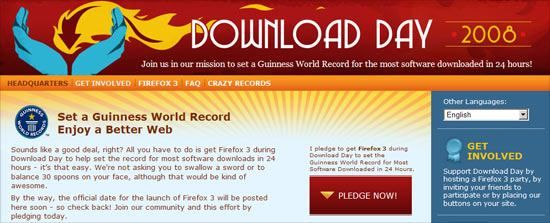
Everyone favorite web browser Firefox is going to launch the 3rd version soon! So, to make it big, Firefox held a campaign to set a Guinness World Record on most downloaded software in 24 hours. Everyone can pledge to download Firefox 3 on the Download Day and be part of the effort to achieve the world record too.

Firefox is my default browser, because it’s a great browser with tonnes of add-ons, customization that will make my web surfing enjoyable and pleasure. Well, if you still using the other browser like the blue “e” icon (aka IE), I think you should try Firefox. You are going to love it.

So, spread the Firefox Download Day, download it on that day, set the World Record and enjoy the better web! πŸ˜€

1st anniversary and 5 things about me

1st anniversary and 5 things about me

Time running fast, with a split of time I already been into blogging for one year! I started to blog one year ago just because I wanted to try it (because everyone is blogging!) but immediately got addicted to it. However, I never knew I can have such determination to continue blogging but obviously the supports from visitors and readers. Thanks everyone :D.

Blogging is really cool and benefiting. I get to know new people, discover new stuff and knowledge and able to express my idea. Some weeks ago, Renee Chung tagged me. Sorry for dragging so long, but since is 1st anniversary and recently my blog was Stumbled (thanks!), I think now is the good time to talk about five things about me.

“Man with less words”

No I’m not Gordon Freeman, but I don’t usually talk much. Everyone who know me will have a impression of me that I’m a super quiet person. I’m not good in getting around with people I don’t know much, but if become my good friend, I might talk a little bit more.

Computer Life

Thanks to my job nature, I spent half of my life in front of computer. At work, in front of computer. At home, in front of computer. I can do many things with it like blogging, research, finding stuff, play games… However, I’m not interested in social networking. I did have one or two account but I just lazy to take care of it. And I don’t usually open my Instant Messaging too. But now I kind of realize that computer life is a bit tiring too..

Escape from Shopping Mall

Seriously I don’t like to go shopping malls. It does not appear interesting to me. Well maybe is because I am alone all the time. When in shopping mall, I see everyone is in pairs and it hurts me. Damn. However there is exception too. The shopping mall I like is Suria KLCC because it has a huge bookstore call Kinokuniya. You can find me spent most of my time in bookstore or lurking CD stores when in mall.

Besides J-pop

My main music genre is going to be Japanese Pop music, but I also listen to other genre as well like Trance and Classical music. Basically music plays important role in my life. But it would be really good if I can play one or two instruments too. When small I learn piano then violin, but unfortunately I stopped. I am totally regret now until the rest of my life. If there is a chance to correct things of my past, I will definitely choose to continue play violin.

Your sparkling pair of eyes

LOL at the title. Actually I have a phobia since small and that is I scared to look to the people’s eye I’m talking to. I’m either looking left,right or down (never up!) and this applies to male and female. I know it’s quite disrespect but I’m trying to overcome it every time. Well now I think I improved.

Well this is it, 5 stuff about me. I think this pretty much sums up my personality. Hope you enjoy reading it. πŸ˜€

End Note:
Post header type generated with Spell with Flickr
Cake icon by Shirokuro-chan

Cool Japan photos at ReallyJapan

Cool Japan photos at ReallyJapan.com

As you guys might know that I’m a Japan freak. I just love Japan and would like to travel there some where in future. Recently, Ruben Frosali are so kind to share his point of view of Japan with his photo blog ReallyJapan. His photos are creative and very different from other Japan photos I saw before. I really like the photos and would like to share with readers here.

Ruben is Italian but now lives and works in Japan. Equipped with a Nikon D80 with Nikkor and Sigma lenses, plus his unique photo taking sense, he captured photos mixed of Japan street urban environments and people that giving a surrealistic, imaginative, humorous and realistic kind of feeling. To be honest, I was amazed by the photos shown on ReallyJapan when first time visit the site. Bravo Ruben! Your photos are cool! Below are some of the photos showcased and be sure to visit the site to view more photos! Besides, you can also check out new stock images at DepositPhotos.com.

Teen girls in Chinatown

Young mommy and her daughter

Future Landscape
Future Landscape

Airport Stereo-type
Airport Stereo-type

Aliens flying over Ueno park

Post header: Yatai in Ueno

3 things I learnt from recent airing J-dramas

3 things I learnt from recent airing J-dramas

Ok, finally a J-drama related post :P. Watching Japanese Drama is been my hobby for several years since Densha Otoko. I like to watch is because I can learn Japanese language as well as getting know Japan better. For this Spring season J-drama, I learnt three things and would like to share here.

Japanese birth rate is among the world lowest

I know this after watching the first episode of CHANGE starring Takuya Kimura. Actually after doing some research on the net, I only know that this problem was long existed. Podcast (episode 22 I think) from Japancast.net had covered this, and so do BBC. According to Wikipedia, Japanese birth rate is actually ranked at the bottom of the world birth rate chart. There is just 8.3 births per 1000 people. And according to World Factbook, Japan’s death rate is even higher than birth rate. So this is really a serious issue because their population is declining and the population of young generation will decrease too.

KY – Kuki Yomenai

This is the current trendy slang in Japan – KY (pronounce as KayWai). I get to know this when watching Aoi Yuu’s drama Osen. KY is abbreviation of Kuki Yomenai (η©Ίζ°—γ‚ˆγ‚γͺい), literally means cannot read the air, and the real meaning is describing a person that unable to read a situation. Discover Japan! blog has pretty good explanation of this slang. So next time when your friend doesn’t read the situation, you can shout to him “KY!” πŸ˜€

Koshien (η”²ε­εœ’) – The god place for high school baseball tournament

I’m not really into baseball stuff but I keep hearing this when watching the manga come drama ROOKIES. Koshien is the short description of Hanshin Koshien Stadium. It’s home court for Hanshin Tigers, and it also held two big high school baseball tournament annually – One is National High School Baseball Championship, played in August, and second is National High School Baseball Invitational Tournament in March, which is a smaller, invitational tournament. Both tournaments are generally known simply as Kōshien. The highschool baseball players look Koshien as a dream stadium to play. I don’t have many idea on this but from the drama and some research, Koshien is a symbolism of the Japanese high school baseball.

Basically this is it! And sorry for lacking in posting in J-drama related stuff, because I think you can get many of the info at d-addicts, Jdorama forum or Tokyograph. But in the future if I found something interesting, I will still make a post of it. πŸ˜€

If You Are Able To Survive You Must Remember That I Love You

This is not a design or Japan related post, but it is so sad and touching that I had to share it with my blog readers. I came across is tearing slide presentation at SlideShare, about a mother protecting her child in the recent earthquake disaster in Sichuan China. Unfortunately the mother was dead because of the hard objects hitting on her. But the rescuer found out that there is a baby under her child and quickly get him out. The child was fine, thanks to his mother. Then the rescuer found a hand phone near the baby and on the screen, it says “My dearest child, if you are able to survive you must remember that I Love You”.

This is such a sad story. In the earthquake that struck last week, it already taken so many people’s life (40,000 and counting), and every life behind there is a family, and there is a story to tell. If there is no earthquake, maybe they are enjoying their life right now with friends and family. But the earthquake just ruined it all. I hope everyone can pray and hope for Sichuan so that everything will become OK. And my respect to all the rescuers and medics and many more unsung heroes who are restless and working hard to save more life.

Tokyo Plastic geisha dolls x Jon Burgerman’s Tiddles

Tokyo Plastic geisha dolls X Jon Burgerman's Tiddles

Look at the sweet collaboration between Tokyo Plastic’s famous geisha dolls with Jon Burgerman’s Tiddles character illustration. This dolls was part of the Tokyo Plastics’ “King of Masters” exhibition at The Showroom in New York City. Well from the result, it is just plugging the Geisha Dolls head into Tiddles, but indeed the result is cool and funky!

I get to know Tokyo Plastic geisha dolls when watching their ultra-entertaining flash animation “drum machine“. The cuteness of the dolls had caught my eye and the animation has been my most favorite flash motion of all time. On the other hand, I’m very admiring on the illustration styles of Jon Burgerman. Both are just amazing and awe-inspiring to me. You can read more about Tokyo Plastic at Tokyo Cube here.

Tokyo Plastic drum machine

Source: Tiddles Tokyo Custom

Inspired by nature: 17 websites with blue sky & clouds

Inspired by nature: 17 websites with blue sky & clouds

This is the 3rd version of “Inspired by nature” series. After the wood and the grass, this time we look high to see websites that inspired by blue sky and clouds. Websites that uses blue sky as part of designs normally gives us a very refreshing, cheerful and delighting feeling, as well as a sense of huge space, life and hope. So, these websites are like telling the sedentary office worker like me that, please get off the chair and go out and take a deep breath and get refreshed by the clear blue sky! πŸ˜€

Some sites used real blue sky and cloud and other sites was using illustration to depict the scene instead. After a trip to some sites, I found 17 websites that utilizes the cheerful, bright blue sky and clouds. One little note is that the BottleBuster site shown below was done by Web Team in the company I worked. I’m in that team too πŸ˜‰

BELLECOUR ECOLES D’ART ET D’INFOGRAPHIE 3D LYON

BELLECOUR ECOLES D'ART ET D'INFOGRAPHIE 3D LYON

Welcome to BIG W

Welcome to BIG W

BottleBuster

BottleBuster

Carbon Neutral Newcastle

Carbon Neutral Newcastle

Dibusoft mmdv

Dibusoft mmdv

Folietto

Folietto

Fresh AIR Apps

Fresh AIR Apps

IMAGE DIVE

IMAGE DIVE

Joomza

Joomza

Julia KrΓΆner

Julia KrΓΆner

Krew Media Group

Krew Media Group

mydezzign studio

mydezzign studio

Peak Plants

Peak Plants

Pixel House

Pixel House

Qwert City

Qwert City

Welcome to Signal7

Welcome to Signal7

Sumisho Urban Kaihatsu

Sumisho Urban Kaihatsu

Above are the 17 sites that has blue sky and clouds as part of the web design. Hope you get inspired from the websites shown above. From all the sites, my most favorite is Folietto and Qwert City. What about you?

Picture header credit: Watching The Heavens Fall by -kol

Learn Japanese language with free podcasts in Itunes

Learn Japanese language with free podcasts in Itunes

First of all, sorry for the lack of updates on this site because I’m quite sick for these few days and still haven’t fully recover yet. Well, last few days I stumbled upon on this article about “Learn 35+ Languages for Free in Itunes” and discover that actually I can also learn Japanese language for free besides attending classes.

What you need to do is first download and install the Itunes player. Then launch it and go to the Itunes Store, and search for “Japanese Language” or “Learn Japanese”, and you will get a list of free podcasts on Japanese language lessons. There is a lot out there and I’m so amazed. I actually downloaded some episodes especially from JapanesePod101 and Japancast. It’s very educational and entertaining, and the quality of the podcasts are very good and I learn a lot from the lessons.

Extra: Display furigana above kanji

Display furigana above Japanese kanji words

Japanese language uses a lot of kanji where sometimes I found hard to identify or read them. But these two FireFox extensions helped me out by displaying furigana on top of the kanji. The first one is Furigana Injector 0.71, and another is XHTML Ruby Support 2.1.2008040101.

It’s very helpful to Japanese learners like me, but somehow I found some display error like the picture above, the “母” was supposed to read as “haha (はは)”, but it shows as “kaka (かか)”. Article was taken from Japanese Wikipedia on Mother’s Day.

Happy Mother’s Day

Last and never forgetting, today is Mother’s Day. Here I wishes “Happy Mother’s Day” to my mom and all the mothers in the world, thanks for all the support and caring for all these years. Here, I dedicated the song “Mother” by SEAMO to all the Jay-han.com blog readers out there and wish you all having a Happy Mother’s Day too πŸ˜€

Share your inspiration with ScrnShots

Share your inspiration with ScrnShots

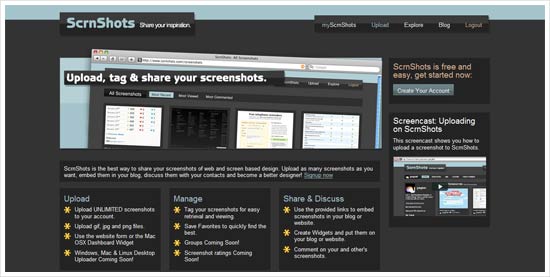
When I found a inspiring websites, normally I will make a screenshot of the site. Until now, I had collected quite a bunch of screenshots and they are scattering inside my hard disk drive. I wanted to share those nice website screenshots with everyone as a gallery in one page but I couldn’t find a way. Fortunately ScrnShots has become the perfect solution.

Today, I received an email and it says that ScrnShots had gone public! I was so excited an quickly sign up an account. ScrnShots is like a Flickr dedicated to web screenshots and screen based design. It looks like an alternative to web design galleries because it was uploaded by community, and the screenshots uploaded can be embed into your blog and any other social sites too. Cool.

Personally I found ScrnShots is fun to use, and the most important thing is, it’s FREE! I really recommend to web designers to sign up and start sharing great web screenshots. This is my account but I just uploaded a few only.

I think ScrnShots is a good service, I think I’m going to stick and play with it for a while πŸ˜‰