Creating Omspace 3D cylinder graphic in Illustrator

03.06.08

Posted by: Jayhan Sim


Creating Omspace 3D cylinder graphic in Illustrator

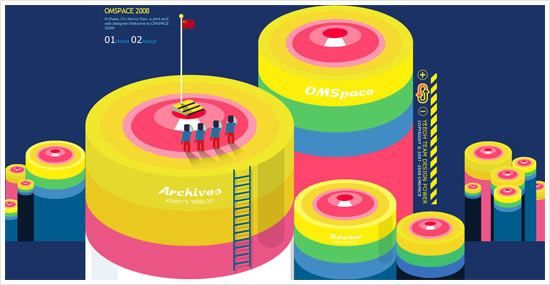
When entering Omspace, a weblog of Kenny Ren, immediately I was attracted by the huge and interesting 3D graphic header. Then, I wonder how to create the 3D Cylinder looking graphic in Illustrator. Well, actually it’s quite simple to achieve and I have plenty of fun too in the process.

To do this tutorial, Adobe Illustrator CS or above is a must, because we need to use the 3D function and if I’m not mistaken only Illustrator version from CS and above support it. Before preceed, please take a look at the preview below on what we are going to do and learn. Besides 3D, we will touch on creating graphic symbols as well as the 3D Map Art function.

01

Symbol 1: Top Surface

First, start off by creating the Top Surface graphic symbol. By using the Ellipse Tool, draw out a perfect circle (press Shift while dragging). Then go to Object > Transform > Scale to open up the Scale windows option. Scale the circle by 80% Uniform and click “Copy”. A new smaller circle is created. Then duplicate it (Crtl-D) several times until you have a total of 6 circles.

After that, by referencing Omspace 3D cylinder, scale and move each of the circle to look as closer as Omspace’s. After that, color each circle with color code shown in the picture below.

02

Looking back at the Omspace 3D cylinder again, there is a white “shine” on the 2nd smallest circle which we are going to create it now. By using the Rectangular Tool, draw out a small rectangular. Then expand the bottom width of the rectangular evenly to left and right.

Place the rectangular on top of the 2nd circle, below the 1st circle. Duplicate the 2nd circle and select it with the rectangular and hit “Divide” on the Pathfinder Palette (Actually, you can use “Intersect” for faster result). Then, ungroup it and delete the unwanted part. Then color the “shine” with white color.

03

Symbol 2: Cylinder Body

The “Top Surface” is finished! Now proceed to “Cylinder Body”. First, select the Rectangular Grid Tool, click on the canvas once to toggle the tool options. Then fill in the options like example shown below. Click “OK” to finish.

04

Ungroup the Rectangular Grid created just now and “Divide” it using the Pathfinder palette. Ungroup it again. Now the grid should become 3 individual rectangulars that placed side by side from top to bottom. Then, color each of the rectangular with color code shown below.

05

Drag “Top Surface” & “Cylinder Body” to Symbols Palette

Finally, two symbols are done. Now, drag them into the Symbols palette. Name them “Top Surface” and “Cylinder Body” respectively. Ok, now the part 1 of the tutorial is now completed. Next, we are going to make the 3D cylinder and map the 2 symbol graphics to it!

06

Creating 3D cylinder and “Map Art”

You can save the document, hide the graphics that created just now and create a new layer to continue. Now, create a circle again with fill gray color only. By selecting the circle created just now, go to Effects > 3D > and select “Extrude & Bevel…”. Fill in the options shown in picture below. After this, click on the “Map Art” button to open up the Map Art window.

07

We are going to map the 2 graphic symbols to this 3D cylinder. In the Surface 1, map it with “Top Surface” symbol. Remember to click “Scale to Fit” and tick “Invisible Geometry”. Skip the Surface 2 and proceed with Surface 3. Map the Surface 3 with “Cylinder Body”. Click the “Scale to Fit” too. Well, you can tick Preview to see the transformation of the 3D cylinder.

08

From the boring gray circle, it becomes an interesting 3D cylinder graphic! I think it looks really close to what’s on Omspace. Well, it’s not finish yet. Duplicate the 3D cylinder to the side as backup. Then select it and click “Expand Appearance” at Object menu. Ungroup it for several times until the Top Surface and Cylinder Body separates.

In this final step, create a rounder rectangular with black fill color and place it at right part of the cylinder. Adjust its transparency to 15% and move it below the Top Surface.

09

Finally finish! Looks how beauty and cute it is. The 3D and Map Art function are really useful and fun to use. You can use it to create many other cool and interesting 3D graphics with different graphic symbols, extrude thickness and many other shapes. Possibility is endless here.

10

End Note
Basically this is the end of this tutorial. You will notice that the program I use is compatible to any web host. Hope you find it useful and have fun experimenting with it. :D And another thing, I almost exceed the bandwidth allowed last month, so from now on I will host the pictures with Photobucket. It’s nice to have a reliable host, you can check some web hosting companies for your blog.


Similar Posts:

71 Responses to “Creating Omspace 3D cylinder graphic in Illustrator”
    Eli
  1. Eli

    Wow! Very nice & extensive tutorial here. I’ll bet it will be very popular on the web this month :)

  2. PrincessBB
  3. PrincessBB

    hehehehe….I am new here…wanna meet designer ^^
    I love design too….going to study interior design at sunway ^^
    Nice to meet u….

    From : PrincessBB
    Bbyinlife.blogspot.com

  4. macadamia
  5. macadamia

    Nice tutorial! Thanks..

  6. Creating Omspace 3D cylinder graphic in Illustrator
  7. Creating Omspace 3D cylinder graphic in Illustrator

    [...] Creating Omspace 3D cylinder graphic in Illustrator By using the Ellipse Tool, draw out a perfect circle (press Shift while dragging). Then go to Object > Transform > Scale to open up the Scale windows option. Scale the circle by 80% Uniform and click “Copy”. A new smaller circle is … [...]

  8. jayhan
  9. jayhan

    Thanks Eli, PrincessBB and macadamia :D . And nice to meet you too PrincessBB :D

  10. David Leggett
  11. David Leggett

    Excellent Tutorial jayhan! That’s a wonderful effect!

  12. Fath
  13. Fath

    I want to learn Illustrator so much but my laptop don’t have enough RAM. So I have to wait a little longer. It’s a nice cylinder. And it’s cute. :)

  14. Lezzie
  15. Lezzie

    What is this Omspace?? How to make it look like that after you dublicated the 6 smaller circles??

  16. jayhan
  17. jayhan

    Thanks David and Fath. Lezzie, Omspace is the blog that i refer in this tutorial. And i assume you are talking about Step 2. Well just move the each circles with arrow key will do ;)

  18. Sam
  19. Sam

    Great tutorial, the end result is nice and clean.

  20. vIn
  21. vIn

    nice tutorial. usually i seldom use the 3d function in Ai

  22. snowflake
  23. snowflake

    Nice tutorial. Thank you!

  24. jayhan
  25. jayhan

    Thanks everyone! :D I also seldom use the 3D function in AI. But it is a very cool tool to explore!

  26. 40 Useful Adobe Illustrator 3D Tutorials and Techniques
  27. 40 Useful Adobe Illustrator 3D Tutorials and Techniques

    [...] 9. Creating Omspace 3D cylinder graphic in Illustrator [...]

  28. 40 бесплатных уроков по созданию различных 3D-объектов с помощью Adobe Illustrator
    40 уроков 3D | Уроки 3D для начинающих | Уроки 3d для начинающих
    125+ Ultimate Round-Up of Illustrator Tutorials | Showcases | instantShift
    40 Useful Adobe Illustrator 3D Tutorials and Techniques | The Muliati.Com goBlog
  29. 40 Useful Adobe Illustrator 3D Tutorials and Techniques | The Muliati.Com goBlog

    [...] Creating Omspace 3D cylinder graphic in Illustrator This tutorial shows you how to create cylindrical shapes using the Extrude & Bevel Tool with [...]

  30. 40 Useful Adobe Illustrator 3D Tutorials and Techniques « DC Guys’s Resource Sharing Blog
    gina michel
  31. gina michel

    Nice and informative site. Keep up the good work.

  32. 50 Excellent 3D Adobe Illustrator Tutorials | Tutorials | Smashing Magazine
  33. 50 Excellent 3D Adobe Illustrator Tutorials | Tutorials | Smashing Magazine

    [...] Creating Omspace 3D cylinder graphic in Illustrator In this tutorial, you will create good-looking 3D cylinders and symbols. [...]

  34. 50 Excellent 3D Adobe Illustrator Tutorials | Graphics of the World
  35. 50 Excellent 3D Adobe Illustrator Tutorials | Graphics of the World

    [...] Creating Omspace 3D cylinder graphic in Illustrator In this tutorial, you will create good-looking 3D cylinders and symbols. [...]

  36. Your Useful 3D Adobe Illustrator Tutorial’s | Free Download Blog
  37. Your Useful 3D Adobe Illustrator Tutorial's | Free Download Blog

    [...] Creating Omspace 3D cylinder graphic in Illustrator [...]

  38. Creating Omspace 3D cylinder graphic in Illustrator | Tutorial Collection
  39. Creating Omspace 3D cylinder graphic in Illustrator | Tutorial Collection

    [...] View Tutorial No Comment var addthis_pub=”izwan00″; BOOKMARK This entry was posted on Friday, June 19th, 2009 at 6:56 am and is filed under Illustrator Tutorials. You can follow any responses to this entry through the RSS 2.0 feed. You can leave a response, or trackback from your own site. [...]

  40. AMB Album » 50 Excellent 3D Adobe Illustrator Tutorials
  41. AMB Album » 50 Excellent 3D Adobe Illustrator Tutorials

    [...] Creating Omspace 3D cylinder graphic in Illustrator In this tutorial, you will create good-looking 3D cylinders and symbols. [...]

  42. 60 Photoshop Illustrator Tools and Tutorials | design box
  43. 60 Photoshop Illustrator Tools and Tutorials | design box

    [...] 34. Guide in Creating Omspace 3D Cylinder Graphic [...]

  44. 41 Excellent 3D Adobe Illustrator Tutorials – 68Design
  45. 41 Excellent 3D Adobe Illustrator Tutorials - 68Design

    [...] Creating Omspace 3D cylinder graphic in Illustrator In this tutorial, you will create good-looking 3D cylinders and symbols. [...]

  46. Gorham Yee
  47. Gorham Yee

    Negged for dishing out serious advice.

  48. 50 herausragende Adobe Illustrator-Tutorials | print24 Blog
  49. 50 herausragende Adobe Illustrator-Tutorials | print24 Blog

    [...] Creating Omspace 3D cylinder graphic in Illustrator [...]

  50. 50 outstanding Adobe Illustrator tutorials | print24 Blog
  51. 50 outstanding Adobe Illustrator tutorials | print24 Blog

    [...] Creating Omspace 3D cylinder graphic in Illustrator [...]

  52. Joaane
  53. Joaane

    This is so freaking cute!!! I have so many ideas running around my head where I can go with this serving as an inspiration for my mini project. I’ve been trying to design a logo somewhat like this for myself (more or less, in essence) and it did not come out as what I hope it would! I didn’t manage to get it looking right like yours did. Finally, I decided to use the professional services of an online logo design site instead (http://www.logodesignstation.com) and got the logo I wanted at an affordable price and fast too, within 24 hours. I did provide this link for reference and inspiration to my designer as I liked how yours look. I’m not going to design a logo without any professional help anytime soon although it’s fun. And enjoyable too. Thanks for posting this! xoxo

  54. 50 Excellent 3D Adobe Illustrator Tutorials « TMHs Web Tips
  55. 50 Excellent 3D Adobe Illustrator Tutorials « TMHs Web Tips

    [...] Creating Omspace 3D cylinder graphic in Illustrator In this tutorial, you will create good-looking 3D cylinders and symbols. [...]

  56. Mark
  57. Mark

    Hey I just used tried this on CS4 and got the same result so CS5 is not needed like said above.

  58. Adobe Illustrator 3D精彩教程 | 爱米粒
  59. Adobe Illustrator 3D精彩教程 | 爱米粒

    [...] Illustrator里的方法和技巧来制作一个逼真的可乐瓶.9. 做一个Illustrator圆 [...]

  60. 20+ Colorful Tutorials to Polish Your Adobe Illustrator Skills | [Re]Encoded.com
    Zachary Graham
  61. Zachary Graham

    Adobe Illustrator has more features than its competitors ‘

  62. Nicole Ellis
  63. Nicole Ellis

    i use adobe illustrator a lot and i really love its great freatures:-.

  64. 20 Useful 3D Illustrator Tutorials for Best Practice | Flash, Design, Vector, Photoshop, Adobe Tutorials | GraphicMania.net
    Cooker Hoods 
  65. Cooker Hoods 

    in our office we use adobe illustrator very much.*-

  66. ১৩১টি Adobe Illustrator Tutorials | টেকনোলজি টুডে ব্লগ
  67. ১৩১টি Adobe Illustrator Tutorials | টেকনোলজি টুডে ব্লগ

    [...] Road Maps in Adobe Illustrator - Use the power of Illustrator to create cool D infographics - Creating Omspace D cylinder graphic in Illustrator - D Charts in Adobe Illustrator CS - D Graphs - How to make retro/futuristic curves in   [...]

  68. 11 Tutoriales illustrator 3D gratis
  69. 11 Tutoriales illustrator 3D gratis

    [...] Creating Omspace 3D cylinder graphic in Illustrator [...]

  70. Melatonin Side Effects ·
  71. Melatonin Side Effects ·

    adboe illustrator is feature packed and i love all of its great features “”

  72. bagel cafe » リアルな3Dイラストの描き方 チュートリアル11選
  73. bagel cafe » リアルな3Dイラストの描き方 チュートリアル11選

    [...] Calendar Icon Working with 3D Objects and Transparencies to Make a Vector Cola Bottle Design Creating Omspace 3D cylinder graphic in Illustrator How to Make a Delicious Vector Orange in 9 Decisive Steps Craft a Delicious Chinese Food [...]

  74. 11 Tutoriales illustrator 3D gratis « CheosWeb
  75. 11 Tutoriales illustrator 3D gratis « CheosWeb

    [...] Creating Omspace 3D cylinder graphic in Illustrator [...]

  76. 45 полезных техник для работы с 3D в Adobe Illustrator – Mendart блог.
    20 Excellent Adobe Illustrator Tutorials | YusraBlog
  77. 20 Excellent Adobe Illustrator Tutorials | YusraBlog

    [...] a Boring Bar Graph into a 3D MasterpieceA Time to ShineCreating Road Maps in Adobe IllustratorCreating Omspace 3D Cylinder graphic in IllustratorCreate a Rotatable Globe in Adobe IllustratorCreate a 3D Push Pin and a Paper Note in IllustratorHow [...]

  78. Illustrator – 40 Tutoriais de Ilustração 3D « Jhony Sato
  79. Illustrator – 40 Tutoriais de Ilustração 3D « Jhony Sato

    [...] 9. Criando Omspace cilindro gráfico 3D no Illustrator [...]

  80. 40 3D Tutorials Using Adobe Illustrator. « The Creative Portfolio of Mark-Anthony
    Useful Adobe Illustrator 3D Tutorials and Techniques « Designing Tricks, Tips, Tutorials
    Excellent 3D Adobe Illustrator Tutorials « Web Designer Blog
  81. Excellent 3D Adobe Illustrator Tutorials « Web Designer Blog

    [...] Creating Omspace 3D cylinder graphic in Illustrator In this tutorial, you will create good-looking 3D cylinders and symbols. [...]

  82. 40 Useful Adobe Illustrator 3D Tutorials and Techniques | Online Music,Movie Entertainment Portal
    Parasar
  83. Parasar

    Thanks for the cool tutorial : )

  84. 10 Illustration Infographic, Lines, Shapes, Charts or Graph Related Tutorials
  85. 10 Illustration Infographic, Lines, Shapes, Charts or Graph Related Tutorials

    [...] Road Maps in Adobe IllustratorUse the power of Illustrator to create cool 3D infographicsCreating Omspace 3D cylinder graphic in Illustrator3D Charts in Adobe Illustrator CSSpice up Pie ChartsHow To Create Outstanding Modern Infographics [...]

  86. 185 Informative Illustrator Tutorials to make You a Better Designer – tripwire magazine
    185 Informative Illustrator Tutorials to make You a Better Designer | BLOG
  87. 185 Informative Illustrator Tutorials to make You a Better Designer | BLOG

    [...] 34. Creating Omspace 3D Cylinder Graphics in Illustrator [...]

  88. 40 Useful Adobe Illustrator 3D Tutorials and Techniques | Graphic Techniques
  89. 40 Useful Adobe Illustrator 3D Tutorials and Techniques | Graphic Techniques

    [...] 9. Creating Omspace 3D cylinder graphic in Illustrator [...]

  90. Curt Cring
  91. Curt Cring

    Hey
    I wasent looking for that but still a great post

    how did you guys found this information??thank you for your blog I found it on Yahoo And I bookmarked it . I’ll share. Please send me updates

    thank you and have a nice day

  92. Hollister
  93. Hollister

    1. This was an amazing site that I had never seen it before. Thanks a lot for the information because I had liked it very much!

  94. เช่า colo
  95. เช่า colo

    Thank you for sharing.I love every article of all.I know more something from your website.Very good website and very interested.

  96. Adobe Illustrator Tutorials – Charts & Graphs « Fundamental Strategic Communications
    Hemlocks
  97. Hemlocks

    Thanks for the post. It was just what I was looking for. :D

  98. 20 Most Amazing 3D Illustrator Tutorials | Digital Photography Magazine
    Useful Adobe Illustrator 3D Tutorials and Techniques | The Wondrous Design Magazine
    40+ Most Brilliant 3D Adobe Illustrator Tutorials | PSDreview
  99. 40+ Most Brilliant 3D Adobe Illustrator Tutorials | PSDreview

    [...] Creating Omspace 3D cylinder graphic in Illustrator [...]

  100. Illustrations that Matter, 40 Useful Adobe Illustrator 3D Tutorials | CreatiWittyBlog
    good but
  101. good but

    My end results is full of blue lines and also when making the grid you cannot ungroup a rectangular grid, you need to expand it first, not mentioned in tutorial?

    Why the blue lines? its not a stroke or anything, its almost like the 3d has added some blue edge lines :(

  102. good but
  103. good but

    Sorry to add to confusion. But point 9 has some errors, it just doesnt split the rectangles up in the order which it says, ungroup does not appear after clicking divide. Also it doesnt state what fill and stroke to have on before you do this which may affect it?

  104. good but
  105. good but

    If you have a stroke on that number 9 part, it wont ungroup it a second time. That is the error in this tutorial. You need no stroke on the rectangular piece when you first make it otherwise it wont ungroup the second time and wont split up. (in the picture it has a black stroke, this seems to be wrong).

  106. jayhan
  107. jayhan

    Hi there, did you tick both of the “Use Outside Rectangle as Frame” and “Fill Grid”?

  108. Tổng hợp những bài hướng dẫn Illustrator hay nhất… |
  109. Tổng hợp những bài hướng dẫn Illustrator hay nhất… |

    [...] 34. Creating Omspace 3D Cylinder Graphics in Illustrator [...]

  110. Maxence
  111. Maxence

    Great tuto, well explained for beginners, thanks for sharing :)

Leave a Reply